
 Continue With Google
 continue with facebook




What if your current hosting can’t handle everything you want to build? Your website may load slowly, or you might need to run custom applications. These limitations can hold back your projects and leave you searching for better options.
A Virtual Private Server (VPS) could give you the flexibility you’re missing. But what is VPS hosting used for, beyond running a website? It provides a separate server environment with allocated resources and greater control. You can host websites, run applications, manage databases, and much more.
This article explores 12 real world VPS hosting examples and explains their practical benefits. You’ll discover which projects need VPS hosting and when upgrading makes sense. You’ll also learn how to choose the right hosting solution for your needs.
What Is VPS Hosting?
VPS hosting is a service that provides an isolated virtual server running on shared physical hardware. It gives you allocated computing resources, including CPU power, RAM, storage, and network capacity. Unlike shared hosting, a VPS usually allows greater control over software installation and server configuration.
A hosting provider uses virtualization technology to create independent virtual environments on a physical server. Each VPS runs its own operating system, such as Ubuntu, Debian, or Windows Server. This separation allows customers to manage their virtual environments without accessing another customer’s operating system.
For example, a VPS plan might include 2 virtual CPUs, 4 GB RAM, and 80 GB SSD storage. These specifications describe the computing capacity available to your virtual server. Actual performance still depends on the physical infrastructure, workload, and provider’s resource allocation policies.
The main purpose of VPS hosting is to provide greater control without renting an entire physical server. You can use it for a WordPress website, an online store, or a custom application. However, a VPS may be unnecessary when standard shared hosting already meets your requirements.
How Does VPS Hosting Work?
VPS hosting works by dividing physical server resources into independent virtual environments using virtualization software. This software creates boundaries between virtual servers while allowing them to share the underlying hardware. Each VPS receives an operating system and a defined allocation of computing resources.
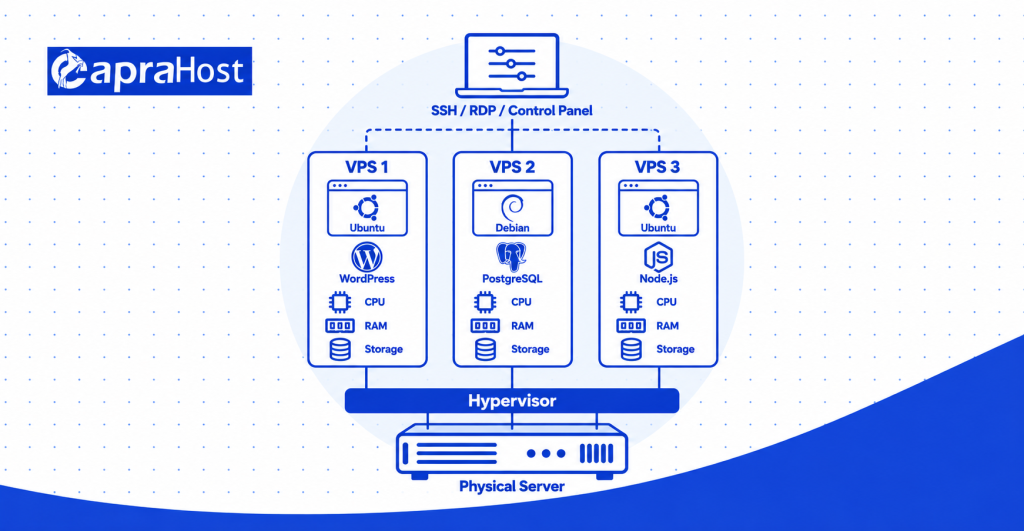
The process involves five main stages.
- Physical server: A hosting company maintains physical hardware inside a data center. The machine provides processing power, memory, storage, and network connectivity.
- Virtualization: A hypervisor creates virtual machines on the physical server. Technologies such as KVM and VMware help manage these isolated environments.
- Resource allocation: The provider assigns virtual CPU capacity, RAM, and disk storage to each VPS. For example, one plan might offer 2 vCPUs, 4 GB RAM, and 80 GB NVMe storage.
- Operating system installation: Each virtual machine runs a compatible operating system. Common choices include Ubuntu, Debian, AlmaLinux, and Windows Server.
- Server access and management: Users connect through SSH, Remote Desktop, or a hosting control panel. They can install software, manage files, and configure security according to their permissions.
Virtualization separates operating environments, but it does not eliminate every shared-hardware limitation. CPU contention, disk activity, and network congestion can still affect performance. The actual level of isolation depends on the virtualization technology and hosting infrastructure.
For example, 3 VPS instances may run on one physical machine with different resource allocations. One instance could host WordPress, another could run PostgreSQL, and the third could host a Node.js application. Each instance operates separately while relying on the same underlying physical infrastructure.
For a technical explanation, see Google Cloud’s guide to virtual private servers.
What Is VPS Hosting Used For? 12 Common Uses
VPS hosting is used for websites, online stores, software applications, databases, game servers, and private business services. Its independent environment supports software customization and workloads requiring more flexibility than standard shared hosting. The following 12 examples explain how these applications work and when a VPS is useful.
1. Hosting Websites and High-Traffic Blogs
VPS hosting can support growing websites and blogs that require greater computing capacity or server control. It is useful for business websites, news publications, and content-heavy online magazines. These projects may exceed shared hosting limits as visitor activity and server processing increase.
Imagine a news website receiving 50,000 visits during a major event. Its server must process page requests, retrieve content, and handle incoming connections. A suitably configured VPS can provide additional computing capacity and more flexible performance optimization.
Website administrators can install Nginx or Apache to serve incoming requests. They can also configure caching, PHP processing, and database connections according to their requirements. This control helps address specific performance bottlenecks that shared hosting may not allow them to change.
However, visitor numbers alone do not determine the necessary VPS size. A cached news article requires fewer resources than a personalized dashboard performing multiple database queries. Monitoring actual CPU usage, memory consumption, and server response times provides better sizing information.
Best suited for: Growing blogs, content-heavy publications, and business websites exceeding their current hosting limits.
2. Running WordPress Websites
A VPS provides a customizable hosting environment for WordPress websites requiring additional resources or specialized server settings. This can benefit membership websites, online learning platforms, and WordPress installations with demanding plugins. Standard shared hosting may restrict certain configurations needed by these projects.
According to W3Techs, WordPress powers 39.7% of websites in its October 16, 2026 survey. This widespread use includes projects with very different hosting requirements. A simple personal blog and a large membership website do not necessarily need the same infrastructure.
For example, a membership website could serve 1,000 registered users with personalized content. Its server may need to process logins, membership permissions, and repeated database requests. A VPS allows administrators to adjust PHP settings, configure caching, and monitor these workloads.
WordPress can run alongside software such as Nginx, Redis, and MariaDB. Redis may reduce repeated database operations when configured with a compatible caching solution. Appropriate configuration depends on the site’s plugins, content, and visitor activity.
A small WordPress blog may work well on shared hosting without additional administration. A VPS becomes more relevant when resource limits or configuration restrictions affect the project. Choosing one should depend on actual workload measurements rather than WordPress usage alone.
Best suited for: Growing WordPress websites, membership platforms, and resource-intensive content management projects.
3. Hosting eCommerce Stores
VPS hosting supports online stores that need configurable resources for product browsing, customer accounts, and checkout operations. Stores built with WooCommerce, Magento, or custom software can benefit from greater server control. Database activity and simultaneous checkout requests can increase computing demand.
Consider a clothing store receiving 200 simultaneous visitors during a promotional sale. Its application must retrieve product information, manage shopping carts, and process checkout requests. Performance depends on caching, database efficiency, server capacity, and the number of active transactions.
A VPS allows administrators to adjust PHP processing, database configuration, and caching behavior. They can also monitor CPU consumption and memory usage during busy periods. These options help determine whether optimization or additional resources are necessary.
Security remains essential because stores may handle customer information and payment-related activity. HTTPS, software updates, access controls, and secure payment integrations help protect the environment. A VPS does not automatically make an online store compliant with payment security requirements.
For a small store, managed eCommerce hosting may be sufficient. A VPS becomes more attractive when customization or resource requirements exceed the existing plan. Evaluate actual store behavior before purchasing additional computing capacity.
Best suited for: Growing WooCommerce stores, custom online shops, and businesses needing configurable application infrastructure.
4. Hosting Multiple Websites on One VPS
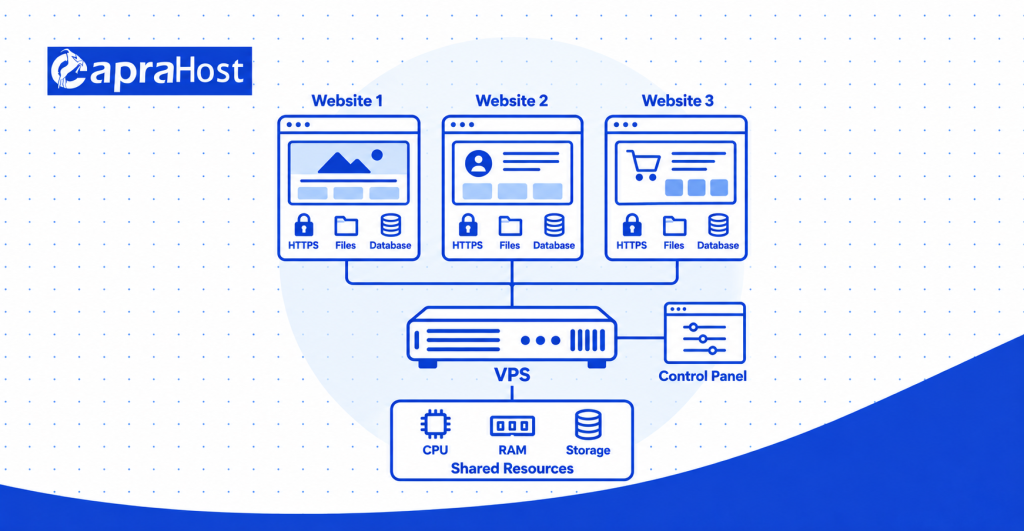
One VPS can host multiple websites while using a shared allocation of CPU, RAM, and storage. This arrangement is useful for freelancers, digital agencies, and businesses managing multiple domains. Each website can use a separate document directory, database, and domain configuration.
For example, an agency might manage 10 small client websites on one appropriately sized VPS. The administrator can configure separate hosting accounts and assign access permissions. A control panel such as cPanel, Plesk, or DirectAdmin can simplify routine website management.
Web server software routes incoming domain requests to the correct website. Nginx and Apache both support configurations for hosting multiple domains. Each website can also have its own HTTPS certificate and database credentials.
However, the number of websites is not the only capacity consideration. Ten static websites might consume fewer resources than one busy WooCommerce store. All hosted projects still depend on the same VPS resource allocation.
Account separation also requires careful configuration when hosting unrelated customers. Separate login credentials alone may not provide complete application or file isolation. Agencies should consider permissions, resource limits, security controls, and backup arrangements.
Best suited for: Freelancers, website agencies, and businesses managing several small or medium-sized websites.
5. Running Web Applications and SaaS Platforms
A VPS can host web applications, custom APIs, and software-as-a-service platforms requiring configurable server environments. Developers can deploy software written in Python, Node.js, PHP, or Java. These applications often need background services, databases, and specific software dependencies.
Imagine a startup developing a customer management platform. Its VPS could run the application backend, connect to a database, and process API requests. Authorized customers would access the service through a website or mobile application.
Developers can install compatible software and manage application processes through the operating system. They can also configure Nginx as a reverse proxy to direct incoming requests. This provides more deployment control than hosting environments with restricted application support.
Docker offers another deployment option for compatible VPS configurations. Containers can package application components with the libraries and settings they require. However, containers still consume the VPS’s allocated CPU, memory, and storage.
A single VPS may support an early-stage application with moderate resource demands. Larger applications can require separate database servers, load balancing, or additional infrastructure. Growth planning should consider availability, deployment processes, and recovery requirements.
Best suited for: Developers, SaaS startups, API projects, and businesses running custom software.
6. Creating Development and Testing Environments
A VPS provides a separate environment for building, testing, and reviewing software before production deployment. Developers can install necessary software without changing their live application server. This separation reduces the risk of untested changes disrupting an existing website.
For example, an agency could maintain a staging copy of a WooCommerce store. Developers can test plugin updates, checkout changes, and website redesigns before publishing them. Once testing succeeds, approved changes can move into production through a controlled deployment process.
A VPS can also host development software such as Git, Docker, and automated testing tools. Teams can configure specific language versions and application dependencies. This helps reproduce the production environment more closely than some local computer setups.
However, a staging VPS needs proper security because it may contain sensitive application information. Developers should avoid using real customer data unless necessary protections are established. Access restrictions, environment isolation, and test data management remain important.
The server also needs enough resources for simultaneous testing activity. Automated builds and integration tests may consume substantial CPU or memory. Monitoring helps teams determine when testing workloads need additional capacity.
Best suited for: Software developers, quality assurance teams, and agencies maintaining production websites.
7. Hosting Multiplayer Game Servers
A VPS can run supported multiplayer game servers and provide remote access to their configuration. Games such as Minecraft and Terraria offer dedicated server software for multiplayer sessions. Resource requirements depend on player activity, game modifications, and server software.
For example, a private Minecraft community might expect 20 simultaneous players. The server must process player movements, world updates, and game events. CPU performance, available RAM, and network latency affect the playing experience.
A VPS gives administrators control over supported game files and configuration settings. They can manage access permissions, install compatible modifications, and schedule server backups. However, some games require specialized hosting or dedicated hardware for demanding workloads.
Data center location also matters for multiplayer gaming. A server closer to most participants generally reduces network travel time. Actual latency depends on routing, connection quality, and the player’s internet service.
Check the provider’s acceptable use policy before deploying a gaming server. Some providers restrict specific gaming workloads or network activity. Also confirm that the operating system supports the intended game software.
Best suited for: Private gaming communities, multiplayer project administrators, and supported dedicated game servers.
8. Running Databases and Backend Services
A VPS can host database software that stores and retrieves information for websites and business applications. Common database systems include MySQL, PostgreSQL, and MariaDB. These systems support customer portals, online stores, and internal inventory platforms.
For example, a business might host PostgreSQL on a separate VPS for inventory management. Its main application server sends database queries through a restricted connection. This arrangement separates database processing from the web application’s CPU and memory usage.
Database administrators can configure memory allocation, storage, and connection limits. They can also establish backup schedules and control who can access stored information. Fast SSD or NVMe storage can help workloads involving frequent disk operations.
However, separating a database introduces additional network communication and operational complexity. Slow queries can remain problematic even when the VPS has more computing power. Query optimization, indexing, monitoring, and application configuration still matter.
Database servers should not expose unrestricted connections to the public internet. Private networking, firewall rules, encrypted connections, and suitable authentication reduce exposure. Recovery planning is also important because database corruption or accidental deletion can affect production applications.
Best suited for: Business applications, developers, and projects requiring independent database management.
9. Hosting Private Email Servers
VPS hosting allows administrators to operate private email infrastructure with greater control over configuration and mailbox storage. Software such as Postfix and Dovecot can support sending and receiving email. Businesses may choose this approach when they need customized email services.
For example, a company could operate 25 employee mailboxes using its business domain. Its administrator would configure mailbox access, storage limits, and incoming email delivery. A separate mail VPS could also keep email administration independent of website hosting.
However, reliable email delivery requires more than installing server software. SPF, DKIM, and DMARC help authenticate email and protect against certain forms of domain spoofing. Reverse DNS, sending reputation, and appropriate network configuration also affect delivery.
A dedicated IP address does not guarantee successful email delivery. A new IP can have limited sending history, while incorrect authentication may trigger spam filtering. Some VPS providers also restrict outgoing SMTP traffic, including connections using port 25.
Running private email infrastructure creates ongoing security and maintenance responsibilities. Administrators must manage software updates, spam filtering, backups, and account security. A managed email service may be more practical when these responsibilities exceed the team’s capabilities.
Best suited for: Organizations requiring custom email infrastructure and experienced mail server administrators.
10. Setting Up Private VPN Servers
A VPS can host a Virtual Private Network server that provides encrypted connections for authorized devices. VPN software such as WireGuard and OpenVPN can create secure communication tunnels. This is useful for remote access and controlled network connectivity.
For example, a small company might configure a VPS-based VPN for 10 remote employees. Authorized team members could connect to approved internal services through the VPN. The administrator would manage authentication, device access, and firewall configuration.
A VPN can also encrypt traffic between a device and the VPN endpoint. This can help protect communication over untrusted networks, including public Wi-Fi. However, encryption does not prevent every privacy or security threat.
A self-hosted VPN does not make internet activity completely anonymous. The VPS provider can still observe certain infrastructure information and network metadata. Privacy also depends on application security, endpoint configuration, and other network services.
Before deployment, confirm that the provider permits VPN operation. The VPS needs sufficient bandwidth and processing capacity for expected connections. Secure authentication and regular software updates are essential for safe operation.
Best suited for: Remote teams, network administrators, and businesses needing controlled remote access.
11. Running Remote Desktops and File Storage
VPS hosting can support remote desktop environments and private file-sharing applications. These services allow authorized users to access software or stored information remotely. Suitable operating systems and access controls are required for both uses.
For example, a business could use a Windows VPS to run compatible accounting software. Employees could access the remote environment through Remote Desktop Protocol, or RDP. Appropriate Windows licensing and provider support must be confirmed before deployment.
A Linux VPS can also support compatible remote desktop software. However, desktop performance depends on CPU capacity, available RAM, and connection quality. Applications with demanding graphics requirements may need specialized infrastructure.
For private file storage, software such as Nextcloud offers another VPS application. A team could use it to upload documents, manage access, and share project files. Storage planning should consider total file size, simultaneous activity, and future growth.
Remote access should never rely on weak passwords or unrestricted administrator exposure. VPN access, multifactor authentication, and restricted network connections can help reduce risk. File storage also requires backup procedures and suitable permission management.
Best suited for: Remote workers, small businesses, and teams needing centrally accessible software or documents.
12. Hosting Backup Servers and Automation Tools
A VPS can store remote backups and run scheduled automation tasks independently of a personal computer. This helps administrators maintain automated processes while their local devices are switched off. Software such as Restic, BorgBackup, and Cron can support these activities.
For example, a production website could send encrypted backups to a separate VPS every night. The backup server would store copies outside the main production environment. This reduces dependence on storage located on the original website server.
However, a second VPS should not become the only backup destination. A resilient strategy includes independent storage, suitable retention periods, and regular recovery testing. Backup security also requires encryption and restricted access.
VPS automation extends beyond file backups. A Python script could check application availability every 15 minutes and record its findings. Another scheduled task might generate business reports or process queued application work.
The VPS must remain available for scheduled jobs to execute reliably. Failed tasks need monitoring, logs, and appropriate alerting. Administrators should also ensure automated software follows the provider’s acceptable use policy.
Best suited for: Developers, system administrators, and businesses needing remote backups or scheduled automation.
What Are the Main Benefits of VPS Hosting?
The main benefits of VPS hosting are more predictable resource access, greater control, stronger isolation, and flexible capacity upgrades. These advantages help support websites and applications with requirements beyond standard shared hosting. Actual benefits depend on the provider, selected plan, and server configuration.
More Predictable Performance and Allocated Resources
VPS hosting provides defined computing allocations that can make application performance more predictable. A plan might include 2 vCPUs, 4 GB RAM, and 80 GB NVMe storage. These resources support application processing, database operations, and file storage.
Allocated resources reduce some uncertainty associated with basic shared hosting. However, a virtual CPU does not always represent exclusive ownership of one physical CPU core. Hardware contention, storage performance, and network conditions can still influence response times.
Greater Control and Customization
A VPS typically allows greater control over the operating system and installed software. Administrators can configure Nginx, Apache, Redis, or other compatible services. This helps projects requiring specific software versions or application settings.
For example, a developer might run Node.js alongside PostgreSQL and a background worker. The VPS allows separate service configuration within the available computing capacity. Managed hosting plans may restrict certain changes, depending on their support policies.
Better Isolation and Security Control
Virtualization separates your VPS operating environment from other virtual servers on the same physical machine. This reduces direct interaction between neighboring customer environments. Administrators can also establish firewall rules, user permissions, and SSH authentication policies.
However, isolation does not guarantee complete protection from security incidents. Weak credentials, outdated applications, and incorrect settings can still create vulnerabilities. Regular patching, monitoring, and secure backups remain essential.
Scalability and Cost Efficiency
A VPS can provide additional capacity without requiring you to rent an entire physical server. For example, a provider might offer upgrades from 2 vCPUs and 4 GB RAM to 4 vCPUs and 8 GB RAM. This allows customers to increase capacity as their workload grows.
Scaling remains limited by the provider’s infrastructure and available plans. Certain upgrades may require a restart, migration, or scheduled interruption. Total costs also depend on management, backups, software licensing, and support.
VPS Hosting vs. Shared, Cloud, and Dedicated Hosting
VPS hosting provides more server control than shared hosting and usually costs less than dedicated physical hosting. Cloud hosting can offer additional infrastructure features, including flexible provisioning and distributed services. The best option depends on workload requirements, technical skills, and budget.
| Feature | Shared Hosting | VPS Hosting | Cloud Hosting | Dedicated Hosting |
| Resources | Shared hosting allocation | Defined virtual allocation | Depends on service | Entire physical server |
| Control | Usually limited | Usually high | Varies by product | High |
| Performance | Depends on shared capacity | More predictable allocation | Depends on architecture | Exclusive hardware capacity |
| Scaling | Plan upgrades | VPS resource upgrades | May support automated scaling | Hardware or server upgrades |
| Cost | Usually lowest | Moderate | Fixed or usage-based | Usually higher |
| Suitable projects | Small blogs and basic sites | Growing websites and applications | Variable or distributed workloads | Resource-intensive applications |
Shared hosting works well for simple websites with ordinary technical requirements. It typically includes a managed environment with limited administrative access. Customers may encounter restrictions involving software installation, CPU usage, or background processes.
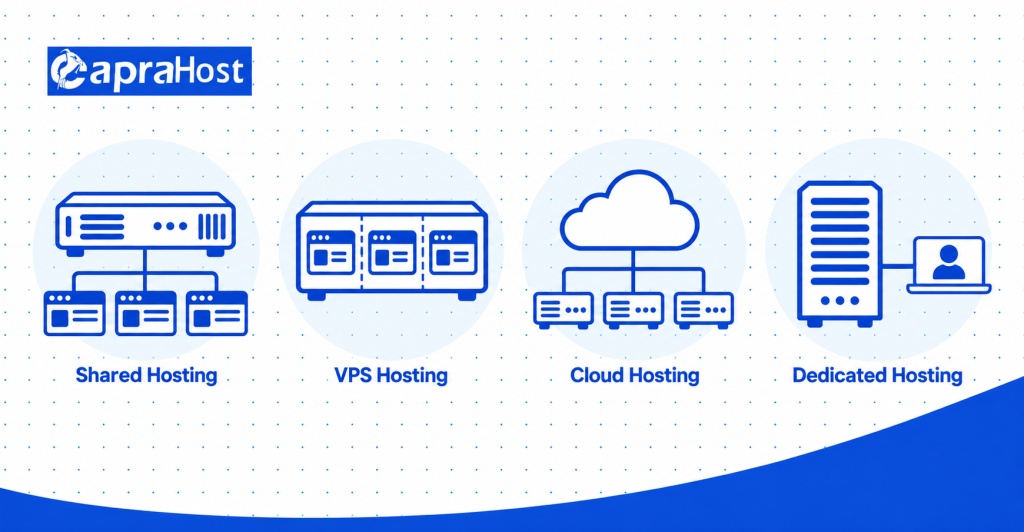
VPS hosting provides greater flexibility while retaining the cost advantages of shared physical infrastructure. For example, a WooCommerce store may use a VPS for specialized caching and server configuration. Its performance still depends on correct sizing and maintenance.
Cloud hosting describes a broader way of delivering computing services. Platforms such as AWS and Google Cloud offer virtual machines, storage, networking, and managed application products. Cloud hosting and VPS hosting can overlap because cloud infrastructure can also provide VPS-like virtual servers.
Dedicated hosting reserves an entire physical machine for one customer. This can suit workloads requiring exclusive hardware access or specialized system configurations. However, dedicated hosting generally introduces higher infrastructure costs and different upgrade considerations.
Who Should Use VPS Hosting?
VPS hosting suits website owners, developers, agencies, and businesses that require additional capacity or server customization. It can support both customer-facing websites and internal applications. The decision should depend on technical requirements rather than business size alone.
Growing website owners may need more control when shared hosting reaches resource limits. For example, a news publication could benefit from customized caching and database settings. A small personal blog may not need these capabilities.
eCommerce business owners may choose VPS hosting for demanding product catalogs and checkout workloads. WooCommerce and Magento installations can involve substantial database activity. More configurable server resources may help when properly optimized and monitored.
Developers and software teams often need specific operating systems, libraries, or background services. They can deploy applications, test updates, and configure software independently. An unmanaged VPS may suit experienced administrators who prefer direct control.
Freelancers and agencies can manage several client websites from one virtual server. Separate accounts and permissions help organize projects. However, each website still consumes resources from the same VPS allocation.
Small businesses may use VPS hosting for private applications, internal databases, or remote access. These uses can require additional security and maintenance planning. A managed VPS may be appropriate when the business lacks internal server administration expertise.
When Should You Upgrade to VPS Hosting?
Upgrade to VPS hosting when your existing plan cannot meet your performance, capacity, or software requirements. A VPS may help when resource restrictions prevent important configuration changes. Confirm the cause of the problem before upgrading.
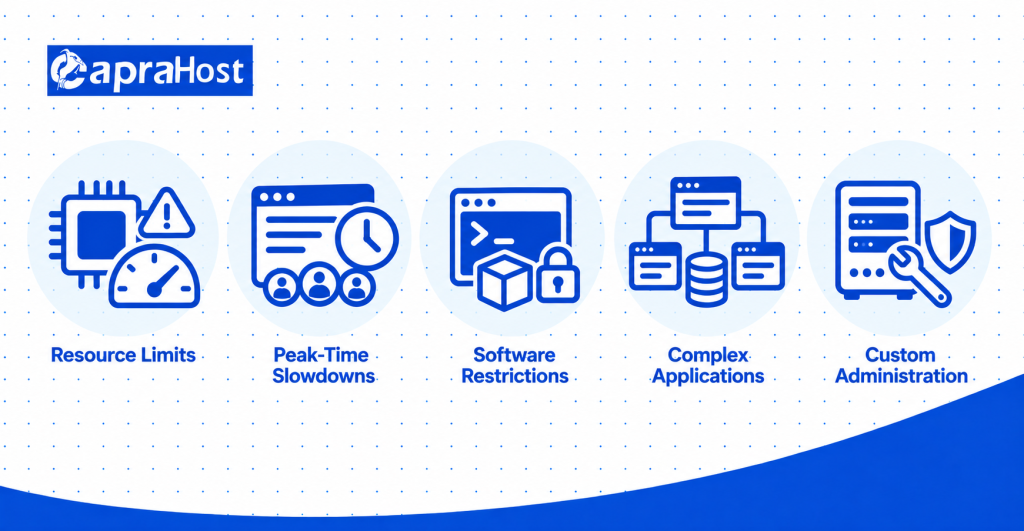
Five practical warning signs can indicate that an upgrade deserves consideration.
- Repeated resource-limit warnings: Your hosting dashboard regularly reports excessive CPU or memory consumption. Check whether the problem comes from real demand or inefficient software.
- Slow performance during busy periods: The website struggles when several visitors perform resource-intensive operations. Review server response time and application logs before deciding.
- Restricted software installation: You need services such as Redis, Docker, or a persistent Node.js process. Your existing plan may not allow them.
- Increasing application complexity: Your project now runs database-heavy features, scheduled jobs, or several connected services. Shared hosting may no longer offer sufficient configuration control.
- Greater administration requirements: You need custom access controls, firewall rules, or operating system configuration. A suitable VPS can offer these capabilities.
Before upgrading, investigate other causes of slow website performance. Large images, inefficient database queries, and poorly configured plugins can create delays. Moving these problems to a VPS may increase costs without resolving them.
Google identifies 2.5 seconds or less as a good Largest Contentful Paint (LCP) result, measured at the 75th percentile. This measures how quickly the main visible content appears to visitors. However, LCP alone cannot determine whether a VPS upgrade is necessary.
See Google’s Core Web Vitals guidance for the official performance thresholds.
When Is VPS Hosting Not the Right Choice?
VPS hosting is unnecessary when simpler hosting already provides sufficient performance, functionality, and technical support. A VPS adds administration responsibilities and usually costs more than entry-level shared hosting. Not every website benefits from greater server control.
A 5-page business website may only need basic hosting for text, images, and contact information. Shared hosting or a managed website platform can handle this type of workload. Paying for additional VPS resources offers limited value without a specific technical requirement.
Beginners without server management experience may also prefer managed hosting. An unmanaged VPS requires operating system updates, security configuration, monitoring, and backups. Incorrect administration can create problems that basic managed hosting would otherwise handle.
Certain applications may benefit more from specialized infrastructure than a single VPS. Examples include rapidly scaling services, large distributed applications, and graphics-intensive workloads. Managed cloud platforms or dedicated servers may better match their operational requirements.
Choose VPS hosting when its additional control or capacity solves a genuine project requirement. Otherwise, simpler hosting may reduce costs and management effort. The correct choice depends on measurable needs rather than the perceived status of a hosting plan.
What Are the Disadvantages and Risks of VPS Hosting?
The main disadvantages of VPS hosting include higher costs, administration requirements, resource limits, and security responsibilities. Its flexibility creates additional decisions involving configuration, maintenance, and monitoring. These responsibilities can increase operational risk when handled incorrectly.
Higher costs are a consideration compared with basic shared hosting. Monthly expenses may include control panel licensing, automated backups, and managed administration. A low advertised server price may not represent the final operating cost.
Technical responsibilities are especially important with unmanaged VPS hosting. Administrators must configure updates, access controls, services, and recovery procedures. Incorrect firewall rules or software changes can interrupt access to hosted applications.
Limited computing resources can also affect performance. For example, a VPS with 2 vCPUs and 4 GB RAM may struggle with memory-intensive applications. Resource exhaustion can cause slow responses, failed processes, or application interruptions.
Security risks remain even when virtual servers are isolated. Malware, weak passwords, exposed databases, and outdated software can compromise an improperly managed environment. Firewalls, SSH keys, software patches, and tested backups help reduce these risks.
Physical infrastructure failures can affect the virtual servers running on that hardware. A damaged storage system or network outage may interrupt service. Provider redundancy, recovery options, and independent backups help reduce potential disruption.
A managed VPS can reduce routine administration but cannot eliminate every operational risk. Check the management agreement to understand which tasks the provider handles. Customers may still be responsible for application-level security and data protection.
How to Choose the Right VPS Hosting Plan
Choose a VPS plan by matching computing resources, management support, security provisions, and total cost to your workload. Start with the software you intend to run and its technical requirements. Then evaluate the hosting plan against expected activity and future growth.
Match CPU, RAM, and Storage to Your Workload
Estimate your CPU, RAM, storage, and bandwidth requirements before choosing a VPS plan. A small WordPress installation might begin with 2 vCPUs and 4 GB RAM. An active eCommerce store may require additional resources depending on its traffic and application configuration.
These figures are examples, not universal hosting requirements. Review existing resource usage, database activity, and expected simultaneous requests. Choose storage capacity with room for application files, logs, and necessary working data.
NVMe or SSD storage can help applications that frequently access disk data. However, faster storage cannot compensate for inefficient database queries or insufficient memory. Performance testing provides more reliable guidance than selecting a plan by specification alone.
Choose Between Managed and Unmanaged VPS
Managed VPS hosting includes provider assistance with agreed server administration tasks. These may include operating system updates, monitoring, and security maintenance. The exact scope varies, so review the support agreement carefully.
Unmanaged VPS hosting places most server administration responsibilities on the customer. It can suit developers experienced with Linux, SSH, application deployment, and security configuration. However, the customer must allocate time to ongoing monitoring and maintenance.
A business without a system administrator may benefit from managed VPS hosting. A developer building a custom deployment environment might prefer an unmanaged plan. Both options should be evaluated against the technical capabilities of the project team.
Check Security, Backups, Uptime, and Support
Review security provisions, backup arrangements, service availability commitments, and technical support before purchasing a VPS. Important controls include firewalls, DDoS protection, secure access, and off-server backup options. Confirm which protections are included and which require additional payment.
Check the provider’s uptime service-level agreement and exclusions. A 99.9% uptime target allows approximately 43.2 minutes of downtime during a 30-day month. This is a mathematical allowance, not a guarantee of actual availability.
Backup frequency and restoration procedures also deserve attention. Daily backups may be insufficient for applications processing important transactions throughout the day. Choose recovery arrangements based on acceptable data loss and downtime.
Technical support differs between providers and service levels. Check availability, contact methods, management scope, and incident response commitments. For production applications, recovery assistance may matter more than a small price difference.
Compare the Total Cost of VPS Hosting
Calculate the complete operating cost rather than comparing advertised VPS prices alone. Software licensing, backups, management, network usage, and support can increase the final amount. Administration time also represents a cost for businesses managing their own servers.
For example, consider a hypothetical VPS costing $15 per month. Adding $10 for backups and $15 for management increases the monthly total to $40. Actual prices depend on the provider, selected services, and billing terms.
Check introductory pricing, renewal charges, resource upgrade costs, and cancellation policies. Confirm whether Windows licensing or hosting control panel software costs extra. A slightly more expensive managed plan may reduce internal administration work.
The right VPS plan should meet technical requirements without unnecessary capacity or unsupported operating responsibilities. Compare the complete service package before making a decision. Choose based on workload suitability, maintenance capabilities, and realistic total cost.
Frequently Asked Questions About VPS Hosting
These questions address common concerns about VPS terminology, cloud infrastructure, technical skills, affordability, and website suitability. They clarify the difference between virtual server technology and commercial hosting services. They also help readers determine whether VPS hosting fits their project.
What Is the Difference Between a VPS and a Virtual Machine?
A VPS is a virtual machine provided as a hosting service, while a virtual machine is a general computing technology. A virtual machine can run on a personal computer, a private server, or cloud infrastructure. VPS hosting packages virtual server resources for customers who need remotely accessible computing capacity.
Is Amazon EC2 Considered a VPS?
Amazon EC2 offers cloud virtual machines that can perform functions similar to traditional VPS hosting. An EC2 instance can host a website, database, or custom application. However, Amazon EC2 belongs to a broader cloud platform with additional networking, storage, and infrastructure services.
Can Beginners Use VPS Hosting Without Technical Knowledge?
Beginners can use VPS hosting more easily when the provider offers suitable managed services. A hosting control panel can simplify website administration and routine account management. However, users should confirm whether the provider handles operating system security, monitoring, and recovery.
Can You Get VPS Hosting for Free?
Some providers offer limited free virtual server access through introductory credits or promotional plans. For example, AWS currently advertises up to $200 in credits for eligible new customers. Its free plan lasts up to 6 months or until credits expire, subject to program conditions.
Free access does not necessarily include unrestricted computing capacity or complete server management. Check resource limits, eligible products, expiration dates, and billing conditions before registering. Current details are available on the AWS Free Tier page.
Can a VPS Run Multiple Applications at the Same Time?
Yes, one VPS can run multiple compatible applications when sufficient computing resources are available. For example, a server might operate WordPress, Redis, and a Node.js service together. Performance depends on combined CPU usage, memory consumption, storage activity, and application configuration.
Is VPS Hosting Worth It for a Small Website?
VPS hosting can be worthwhile for a small website requiring custom software or administrative control. A small application may need background workers, special libraries, or specific operating system settings. However, a basic 5-page website often works adequately on shared or managed hosting.
Final Thoughts: Is VPS Hosting Right for You?
VPS hosting is useful when your project needs greater flexibility, computing capacity, or control than shared hosting provides. Its applications include WordPress, eCommerce, software development, databases, gaming, and private business infrastructure. However, the right configuration depends on the workload and the skills available to manage it.
Before upgrading, examine your current resource usage, application requirements, and hosting limitations. Compare managed and unmanaged plans alongside security, backups, and total operating costs. If your existing hosting already performs well, an upgrade may not be necessary.
For CapraHost customers, the next step is to compare available VPS configurations against actual project requirements. Check the resources, management options, and included services before selecting a plan. Choose the hosting environment that solves your current requirements while leaving suitable room for growth.