
 Continue With Google
 continue with facebook




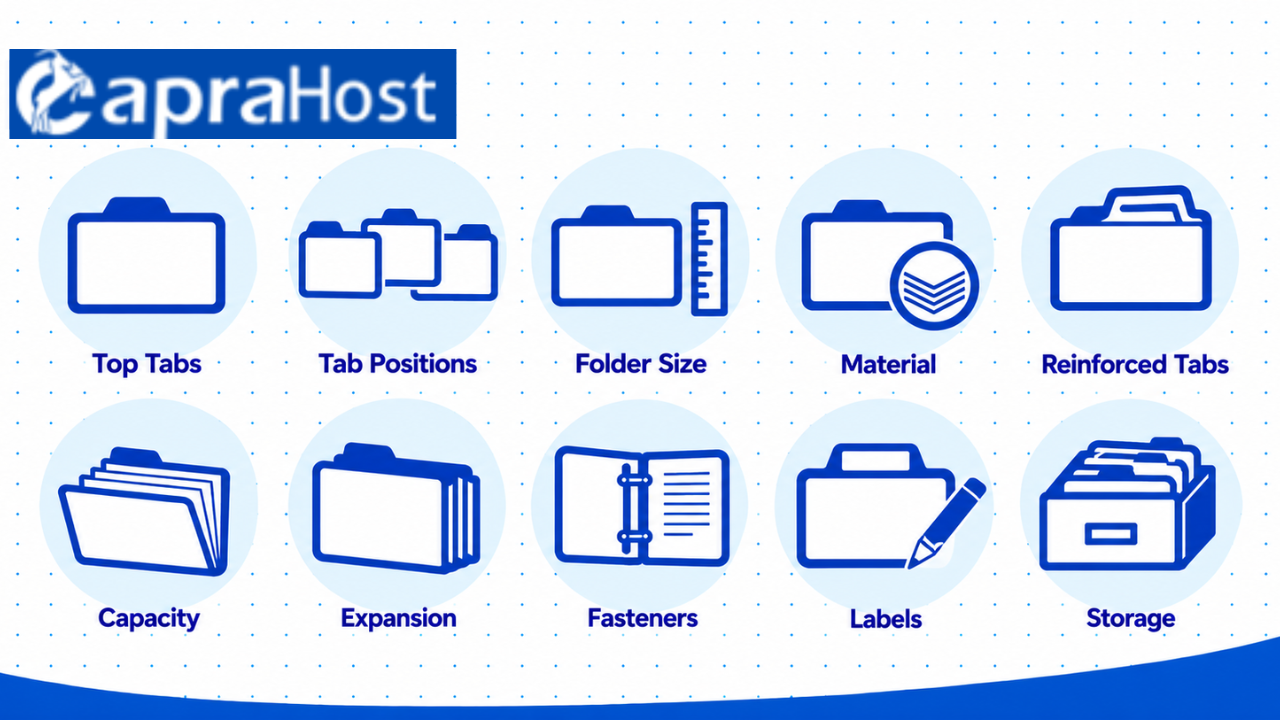
Top tab file folders are a practical way to organize, store, and find paper documents. They have raised tabs along the top edge, making labels visible inside filing drawers. These folders are commonly used in offices, schools, businesses, and homes to keep paperwork organized.
They come in different sizes, materials, and tab styles to suit various filing needs. Options include manila folders, colored folders, reinforced tabs, and folders with fasteners. Choosing the right type helps protect documents, improve organization, and make everyday filing easier.
Before buying top tab file folders, it’s important to understand their features and differences. This guide covers 10 essential things to know, including folder types, sizes, tab cuts, durability, and storage compatibility. You’ll also learn how to choose folders that match your filing needs and budget.
1. What Are Top Tab File Folders?
Top tab file folders are document holders with raised labeling tabs along their upper edges. The tabs display file names when the folders stand upright inside a drawer. This design helps users identify paperwork without removing every folder from storage.
Most standard top tab folders consist of folded paperboard with one open top and two connected panels. Documents rest between these panels, while the tab provides space for a handwritten or printed label. The folder itself does not require special equipment, although filing cabinets and hanging folders provide additional support.
Why Are Top Tab File Folders Useful?
Their main benefit is making paper documents easier to organize, identify, and retrieve. Users can separate paperwork into categories such as invoices, employee records, and customer correspondence. Clear labels reduce the need to open unrelated folders when searching for a particular document.
Top tab folders also support different filing methods, including alphabetical, numerical, and subject-based organization. For example, an office might arrange customer files by surname or assign each account a reference number. A home filing system might separate tax paperwork, insurance policies, and household warranties.
Top tab folders are especially suitable when labels need to be read from above. They work in vertical drawers, compatible lateral cabinets, desktop organizers, and storage boxes. However, they are generally less convenient for open shelves where folder labels face sideways.
2. Understand the Different Types of Top Tab File Folders
Top tab file folders come in several designs, including manila, colored, reinforced, pressboard, and specialty options. Each design differs in material strength, organization features, or document capacity. Understanding these differences helps buyers avoid paying for features they do not need.
Manila and Colored File Folders
Manila top tab file folders are commonly used for general office and household paperwork. Their paperboard construction provides a simple way to separate documents without adding unnecessary weight. They suit everyday records such as invoices, bills, correspondence, and project notes.
Colored file folders provide the same basic organization function while adding a visual identification system. For example, an office might assign blue to accounting, green to personnel records, and yellow to active projects. Color coding works best when everyone follows the same filing rules.
Reinforced and Heavy-Duty File Folders
Reinforced folders have strengthened tabs that help withstand repeated handling. Some designs use a second layer of paperboard around the tab to reduce bending and tearing. These are useful for frequently accessed paperwork, such as active client records or daily administrative files.
Heavy-duty pressboard folders provide greater rigidity than ordinary manila folders. They are suitable for substantial document collections, including legal files, employee records, and ongoing business projects. However, thicker material does not automatically mean a folder has greater expansion capacity.

Folders With Fasteners, Dividers, or Expansion
Fastener folders contain built-in metal or coated prongs that secure hole-punched documents. They help preserve page order in records such as contracts, applications, and personnel paperwork. Buyers should check fastener positions before ordering because designs vary.
Classification folders contain internal dividers that separate one file into distinct sections. Expandable folders include scored folds or gussets that provide additional space for growing document collections. Plastic folders offer another option when greater tear or moisture resistance is needed.
3. Check Top Tab File Folder Sizes and Dimensions
Top tab file folders are primarily available in letter and legal sizes, based on the documents they hold. Choosing the correct size prevents paper from extending beyond the folder’s edges. Buyers should also verify the cabinet dimensions before purchasing a large quantity.
Letter Size vs. Legal Size Folders
Letter-size folders accommodate standard 8.5 × 11-inch paper. They are suitable for everyday office documents such as invoices, reports, forms, and correspondence. Letter-size filing equipment is designed to support this document format.
Legal-size folders accommodate 8.5 × 14-inch paper, providing 3 additional inches of document length. They are useful for longer paperwork, including certain contracts, legal records, and administrative forms. Their larger dimensions require compatible storage space inside filing drawers or boxes.
| Feature | Letter Size | Legal Size |
| Document size | 8.5 × 11 inches | 8.5 × 14 inches |
| Typical use | General office paperwork | Longer legal or business documents |
| Storage requirement | Letter-compatible filing space | Legal-compatible filing space |
| Main consideration | Standard document fit | Additional folder length |
Folder Dimensions Are Not Paper Dimensions
The actual folder is slightly larger than the paper it holds. This extra material helps protect document edges and creates space for the raised tab. For example, one standard manufacturer’s specifications list a letter folder measuring approximately 9.5 × 11.625 inches before considering tab placement.
Folder dimensions vary by design, reinforcement, and manufacturer specifications. Legal-size folders also require additional drawer clearance compared with letter-size versions. Always compare the product’s external measurements with the available storage space.
4. Understand Top Tab Folder Cuts and Positions
Top tab folder cuts determine tab width, while tab positions determine where the label appears. Different cuts affect available writing space and how easily neighboring labels can be seen. The correct choice depends on label length and filing arrangement.
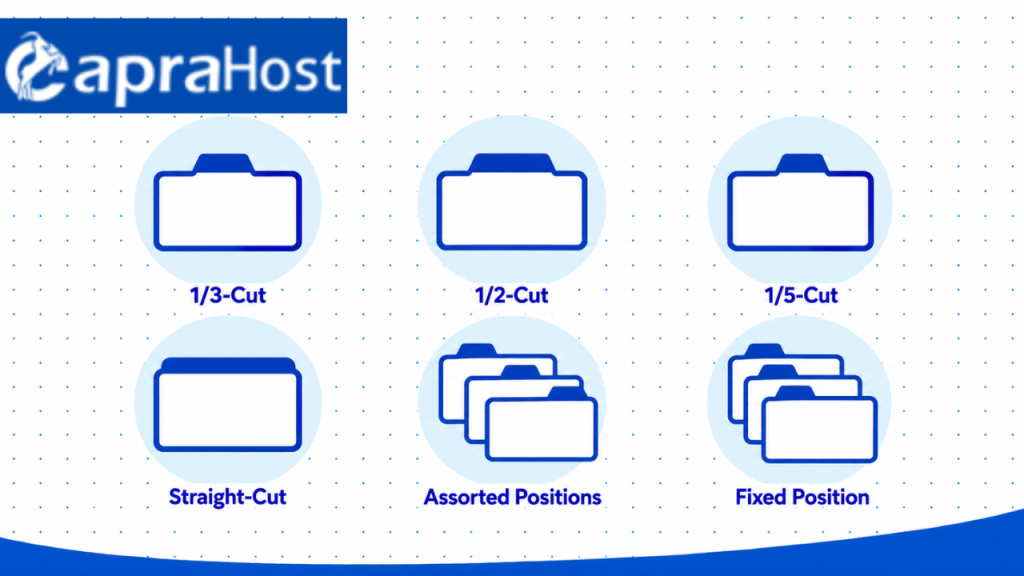
1/3-Cut, 1/2-Cut, and 1/5-Cut Tabs
A 1/3-cut tab occupies approximately one-third of the folder’s width. It generally comes in 3 positions: left, center, and right. Alternating these positions creates a staggered arrangement that helps keep nearby labels visible.
A 1/2-cut tab covers approximately half the folder’s width. It commonly offers 2 positions and a wider area for writing or attaching labels. This makes it useful for longer descriptions, including employee names or project references.
A 1/5-cut tab occupies approximately one-fifth of the folder’s width. It supports 5 tab positions and provides less individual labeling space than wider cuts. This arrangement can suit short identifiers, including initials, file numbers, or compact alphabetical labels.
Straight-Cut and Assorted Tab Positions
A straight-cut tab runs across the folder’s top edge and provides extensive labeling space. This design works for descriptive names such as department records or detailed project references. Its full-width tab may be less suitable when staggered label placement is preferred.
Assorted-position folders contain tabs placed at different points along the top edge. For example, a 1/3-cut assortment commonly includes left, center, and right positions. Fixed-position packages instead contain folders with the same tab placement.
| Tab Cut | Typical Positions | Suitable Use |
| 1/3-cut | 3 | General office filing |
| 1/2-cut | 2 | Longer folder labels |
| 1/5-cut | 5 | Short reference labels |
| Straight-cut | Full width | Detailed file descriptions |
For general filing, 1/3-cut tabs offer a practical balance between label space and staggered visibility. Wider tabs work when filenames require more room. Before ordering, confirm whether the package contains assorted or fixed positions.
5. Know the Difference Between Top Tab, End Tab, and Hanging Folders
Top tab, end tab, and hanging file folders serve different storage purposes. Their differences involve label placement, folder design, and compatibility with filing equipment. Choosing the correct style makes stored documents easier to locate.
Top Tab vs. End Tab File Folders
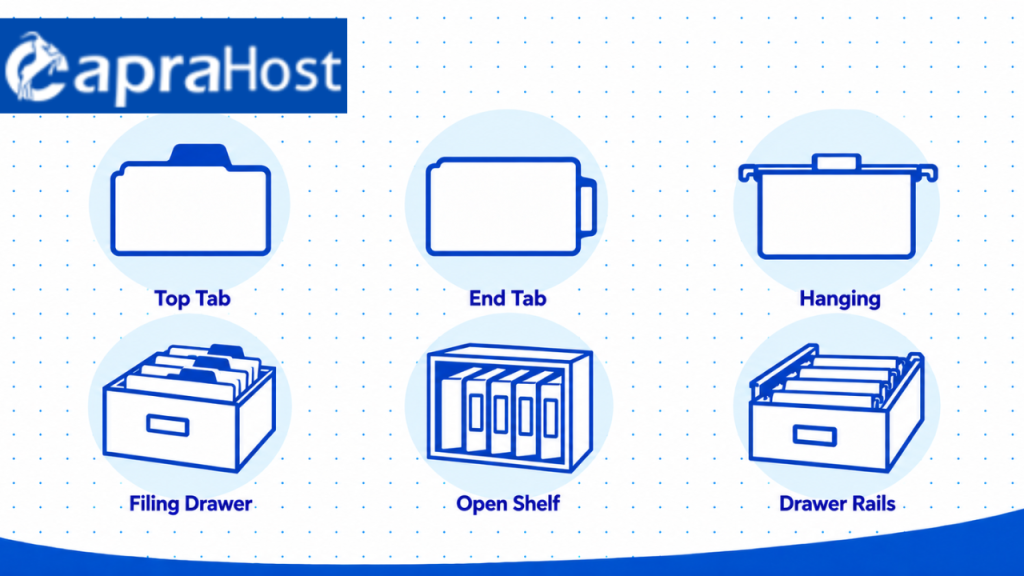
Top tab folders display labels along the upper edge, making them suitable for drawer-based filing. They are commonly arranged front to back inside filing cabinets or storage boxes. Users identify a record by viewing its label from above.
End tab folders display labels along the side edge, making them suitable for open shelving. Their labels remain visible when folders stand upright like books. This arrangement is often used for large collections of legal, medical, or administrative records.
Top Tab vs. Hanging File Folders
Hanging folders use metal or plastic-supported rails to remain suspended inside compatible filing drawers. They typically include movable label tabs and provide a supported space for storing paperwork. Standard top tab folders do not have the same hanging rail structure.
Top tab folders can sit inside hanging folders when their sizes and heights are compatible. For example, a letter-size hanging folder may hold several thin letter-size folders for related client documents. However, overfilling can obscure labels or prevent the hanging folder from closing neatly.
| Folder Type | Label Location | Best Storage Method |
| Top tab | Upper edge | Filing drawers and boxes |
| End tab | Side edge | Open filing shelves |
| Hanging | Adjustable upper label | Rail-equipped drawers |
Choose the folder type according to your existing storage system. Top tabs suit conventional drawer filing, while end tabs support side-visible shelf filing. Hanging folders provide additional support when the filing cabinet has compatible rails.
6. Identify the Most Common Uses of Top Tab File Folders
Top tab file folders organize paper documents in offices, homes, schools, and professional workplaces. Their raised labels help users identify paperwork stored inside drawers. The same basic folder design supports different record categories and organization methods.

Office and Business Records
Businesses use top tab folders to separate invoices, contracts, employee records, and customer correspondence. An accounting department might create one folder for each client and arrange them alphabetically. An administrative office might group paperwork by department, project, or reporting period.
Home Paperwork and Financial Documents
Home filing systems use top tab folders for bills, warranties, insurance policies, and tax documents. For example, homeowners can create separate folders for property paperwork, vehicle insurance, and household expenses. This arrangement keeps important records grouped by purpose rather than mixed together.
School and Student Files
Schools use file folders for attendance records, enrollment documents, administrative forms, and student paperwork. A school office may arrange records alphabetically or by assigned student identification numbers. Teachers can also use folders to separate lesson materials, assignments, and classroom records.
Legal, Medical, and Administrative Paperwork
Professional offices use file folders to organize case records, personnel files, billing documents, and administrative forms. Fastener folders can keep punched pages together when document order matters. Sensitive paperwork should also be stored securely, with access limited to authorized personnel.
7. Choose the Right Material, Capacity, and Features
The right top tab file folders should match document size, handling frequency, storage space, and record thickness. These four considerations determine whether standard folders are sufficient or stronger designs are necessary. Checking specifications before ordering reduces compatibility problems and unnecessary purchases.
Choose Material Based on Durability
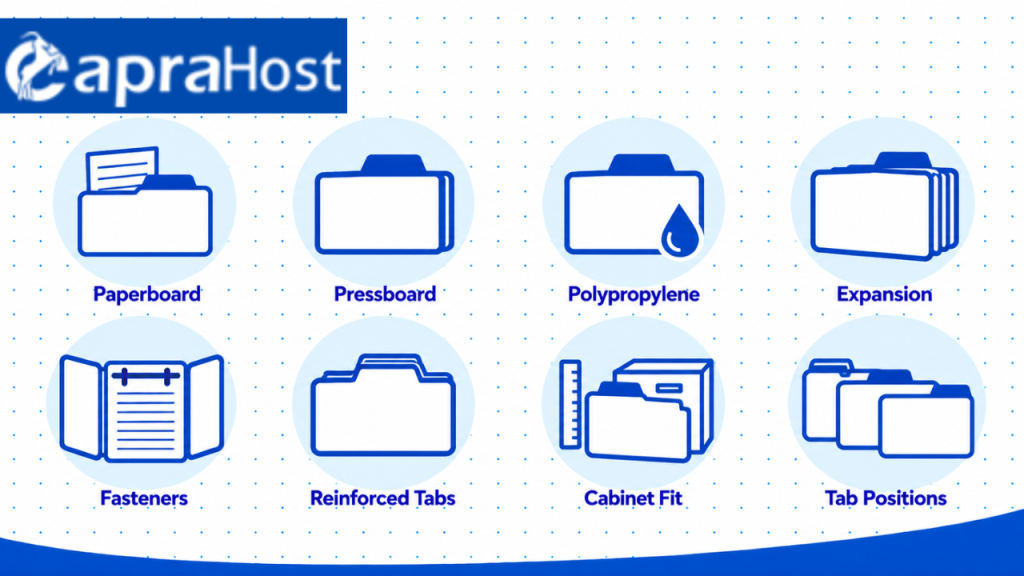
Standard manila paperboard suits routine filing, while thicker pressboard offers greater rigidity. Material thickness is sometimes expressed in points, abbreviated as pt. One point represents approximately 0.001 inch of nominal material thickness, although actual measurements may vary.
Common product descriptions include 11-point manila, 14-point heavy paperboard, and 25-point pressboard. These numbers describe material thickness rather than the number of documents a folder can hold. A thicker folder may resist bending better, but construction and reinforcement also influence durability.
Polypropylene folders offer greater resistance to tearing and incidental moisture exposure than ordinary paperboard. However, moisture resistance does not mean every plastic folder is completely waterproof. Check the product specifications when protection against moisture is a major concern.
Check Expansion and Storage Capacity
Folder expansion describes how much additional thickness the folder design can accommodate. Some standard top tab folders have scored folds allowing approximately 3/4 inch of expansion. Heavier expanding designs may provide 1-inch, 2-inch, or larger capacities.
For example, a thin collection of invoices may fit inside a standard manila folder. A growing legal case file may require a reinforced expanding folder with dividers. Avoid estimating sheet capacity solely from expansion because paper thickness and attachments vary.
Decide Whether You Need Fasteners or Reinforced Tabs
Fasteners hold punched documents together, while reinforced tabs protect the labeling area during frequent handling. These features address different filing needs and are not interchangeable. A folder can contain one feature, both features, or neither.
Choose fasteners when records must remain in a fixed order, such as employee forms or contract pages. Select reinforced tabs when files are repeatedly removed and returned to storage. For records handled infrequently, ordinary folders may provide sufficient durability.
Verify Compatibility Before Ordering
Measure the available filing space and compare it with the manufacturer’s folder dimensions. Check drawer width, depth, rail arrangement, and clearance above the raised tabs. Confirm that the cabinet accommodates your chosen letter-size or legal-size format.
Also check whether the product uses left, center, right, or assorted tab positions. Consistent tab placement supports an existing labeling system and prevents unexpected layout changes. These checks are especially important when adding folders to an established office filing system.
8. Learn How to Organize and Label Top Tab File Folders
Organize top tab file folders with clear labels, consistent categories, and a filing method suited to your documents. A structured arrangement makes paperwork easier to locate and return after use. It also helps other authorized users understand where records belong.
Create Clear and Consistent Labels
Use descriptive folder labels that identify the contents without requiring the folder to be opened. Include useful details such as a client name, document category, or reporting year. For example, “Client A – Invoices 2026” provides more information than “Miscellaneous.”
Choose a consistent label format t hroughout the filing system. Printed labels offer uniform lettering, while neatly handwritten labels can work for smaller collections. Avoid overcrowding narrow tabs with descriptions that become difficult to read.
Choose a Filing and Color-Coding Method
Alphabetical, numerical, and subject-based filing methods suit different document collections. Alphabetical filing works for names such as Adams, Brown, and Carter. Numerical filing works for account references such as 1001, 1002, and 1003.
Subject-based filing separates categories such as Taxes, Insurance, and Contracts. Color coding can further distinguish departments, document types, or project stages. For example, blue might identify Finance, green might identify Human Resources, and yellow might identify Projects.
Arrange Folders for Easy Retrieval
Use file guides and visible tabs to divide large filing collections into manageable groups. Keep labels facing the same direction and arrange the records according to your chosen method. Frequently accessed files may be placed in an easily reached drawer or designated active-file area.
Avoid moving selected folders to the front when doing so disrupts alphabetical or numerical order. Instead, create a separate active-file section with its own consistent arrangement. Review the filing system periodically to replace damaged labels and remove records according to applicable retention rules.
9. Avoid Common Top Tab File Folder Problems and Mistakes
Common filing mistakes include incorrect sizing, overfilling, unclear labels, damaged tabs, and unsuitable storage. These problems can reduce folder lifespan and make important documents difficult to retrieve. Most can be prevented through proper selection and routine maintenance.
Choosing the Wrong Size or Tab Cut
An incorrectly sized folder can leave paper edges exposed or prevent the folder from fitting properly. Letter-size paper measures 8.5 × 11 inches, while legal-size paper measures 8.5 × 14 inches. Confirm document size and cabinet compatibility before purchasing.
Choosing unsuitable tab positions can also make labels difficult to scan. For example, repeatedly placing same-position tabs directly behind one another can obscure filenames. Use staggered positions when visibility matters, or fixed positions when straight-line filing is preferred.
Overfilling and Damaging Folder Tabs
Overfilling can distort folder folds, strain fasteners, and damage the tab during repeated handling. Standard folders are not designed to accommodate unlimited paperwork. Check the stated expansion allowance and select a larger design when necessary.
Avoid pulling a heavily loaded folder entirely by its tab. Support the folder body when removing substantial records from a cabinet. Reinforced tabs help reduce wear but do not eliminate damage caused by excessive weight.
Using Poor Labels or Inconsistent Organization
Unclear labels increase the effort required to identify documents correctly. A folder labeled “Miscellaneous” gives little indication of its actual contents. More specific wording, such as “Tax Returns 2026,” helps distinguish the record from unrelated paperwork.
Inconsistent naming creates similar problems across larger filing systems. Choose one labeling pattern and apply it to every relevant folder. Use file guides to separate major categories and prevent documents from being returned to the wrong location.
Improper Storage and Moisture Exposure
Paper folders can weaken or become damaged when stored in damp conditions. Keep them away from leaking pipes, wet floors, and areas where condensation develops. Store important records inside clean, dry cabinets or suitable document boxes.
Avoid placing heavy objects directly on unsupported folder tabs. Check stored paperwork periodically for signs of moisture, bending, or label deterioration. Sensitive and irreplaceable documents may require more protective archival storage than ordinary office folders provide.
10. Compare Top Tab File Folder Prices and Buying Value
Top tab file folder prices depend on size, material, reinforcement, special features, and package quantity. Standard manila folders usually have fewer construction features than pressboard or classification designs. Buyers should compare specifications alongside price rather than choosing the cheapest package automatically.
What Affects File Folder Prices?
Material thickness and construction influence how much a folder costs. Standard 11-point manila products generally target everyday filing, while heavier designs use additional material. Reinforced tabs, fasteners, dividers, and expansion gussets can also increase the price.
Letter and legal sizes may have different prices because their material requirements differ. Colored designs and specialty features can introduce additional cost differences. Compare products with matching specifications to make price comparisons meaningful.
Standard vs. Reinforced Folder Value
Standard folders may provide better value for paperwork that is stored and retrieved infrequently. Reinforced designs may justify a higher price when files receive repeated handling. The value depends on usage, replacement frequency, and the strength required.
For example, a household warranty folder might remain untouched for several months. An active client folder may be removed from a drawer daily. These different handling patterns justify considering different levels of reinforcement.
Bulk Buying and Cost Per Folder
Buying larger packs may reduce the individual folder price, but discounts are not guaranteed. Compare packages containing 25, 50, 100, or more folders using the same calculation. Include shipping charges when comparing the total purchase cost.
Cost per folder = Total package price ÷ Number of folders
For example, a hypothetical $30 package containing 100 folders costs $0.30 per folder. A $20 package containing 50 identical folders costs $0.40 per folder. The first package offers the lower unit price before shipping or additional charges.
What to Check Before Purchasing
Review folder dimensions, tab style, material, expansion allowance, fasteners, and pack quantity before ordering. Check whether a listing describes the paper size or the actual outer folder measurements. Confirm that the storage equipment supports the chosen design.
Buy only the features necessary for your filing workload. Standard folders can suit general paperwork, while reinforced or expanding designs support more demanding use. Selecting the appropriate product helps control spending without compromising organization.
Frequently Asked Questions About Top Tab File Folders
Can You Use Top Tab File Folders Inside Hanging Folders?
Yes, compatible top tab folders can be placed inside hanging file folders. The hanging folder provides support inside a rail-equipped filing drawer. Check size, tab height, and capacity to prevent overcrowding.
How Many Papers Can a Top Tab File Folder Hold?
The capacity depends on folder expansion, paper thickness, and whether fasteners are installed. A folder with 3/4-inch expansion can accommodate a thicker collection than a flat folder. Check the manufacturer’s specifications instead of relying on a universal sheet count.
Are Reinforced Top Tab File Folders Worth It?
Reinforced tabs are useful when paperwork is accessed and refiled frequently. The additional material helps reduce tab bending and tearing during handling. Standard folders may be sufficient for records that remain in storage.
Can You Print Labels for Top Tab File Folders?
Yes, printable adhesive labels can be used on compatible top tab folders. Choose a label size that fits the tab’s available writing area. Use a consistent font and naming pattern to make file identification easier.
Are Top Tab File Folders Reusable?
Yes, undamaged top tab folders can be reused for different document categories. Remove outdated labels or cover them with new, clearly printed labels. Replace folders with torn panels, weakened folds, or severely damaged tabs.
Are Top Tab Folders Still Useful in Modern Offices?
Yes, top tab folders remain useful when organizations maintain physical documents alongside digital records. They provide an accessible filing method for paperwork requiring physical handling or storage. Their usefulness depends on document retention needs, security requirements, and existing office workflows.
Final Thoughts
Choosing the right top tab file folders starts with understanding your documents and filing system. Consider size, tab cut, material thickness, durability, expansion capacity, and storage compatibility before purchasing. These details help prevent wasted purchases and improve everyday document organization.
For routine paperwork, standard manila folders may provide everything you need. Frequently handled or substantial records may benefit from reinforced tabs, fasteners, or expandable construction. Compare specifications and cost per folder to select a product that fits your needs and budget.